HUD, EKF & Vibration
For SparkNavi Blue / Blue2. Screens and parameter names may vary with the ArduPilot / Mission Planner version.
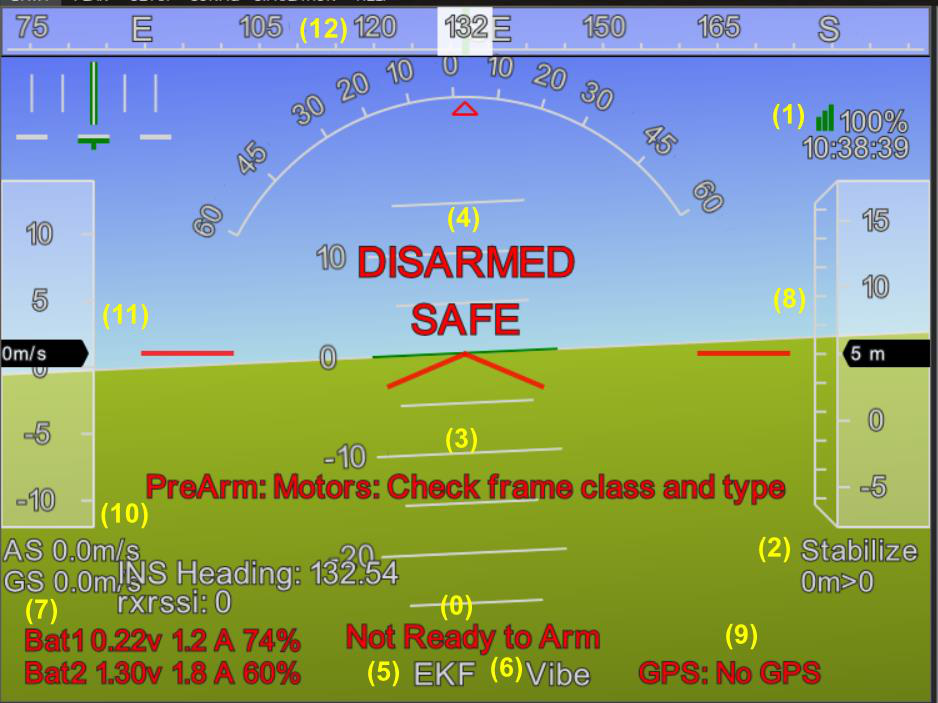
Numbered HUD reference
| No. | Item | Meaning / action |
|---|---|---|
| 0 | Ready / Not Ready to Arm | Read PreArm messages and resolve their cause. |
| 1 | Telemetry link | Ground-station packet reception; distinct from RC RSSI. |
| 2 | Mode / waypoint | Current mode, waypoint distance and index. |
| 3 | Messages | Live warnings, frame and sensor status. |
| 4 | DISARMED / ARMED / SAFE | Arming and safety-switch state. |
| 5 | EKF | Estimator consistency; interpret with messages and logs. |
| 6 | Vibe | X / Y / Z vibration and Clip0 / 1 / 2 counts. |
| 7 | Bat1 / Bat2 | Voltage, current and remaining charge; verify monitor calibration. |
| 8 | Altitude | Normally relative to Home, not direct terrain clearance. |
| 9 | GPS | Fix status; RTK Float is not an integer-fixed solution or a guarantee of centimeter accuracy. |
| 10 | AS / GS | Airspeed / groundspeed. |
| 11 | Speed tape | Shows the speed selected by the HUD configuration. |
| 12 | Heading tape | Current heading, read alongside attitude. |
Arming & Safety Switch
BRD_SAFETY_DEFLT controls safety-switch startup behavior; DISARM_DELAY affects automatic disarming delay. Neither resolves a PreArm fault. Configure for the system, write and reboot, and fix the cause of a warning.
EKF Status
Click EKF to inspect velocity, horizontal / vertical position, compass and terrain indicators. For a brief change, check what the vehicle and sensors were doing at that time. Persistent growth, recurring faults or failsafe activation require stopping the test and checking GPS, compass, vibration, power and logs. No single bar value predicts an exact time to loss of control.
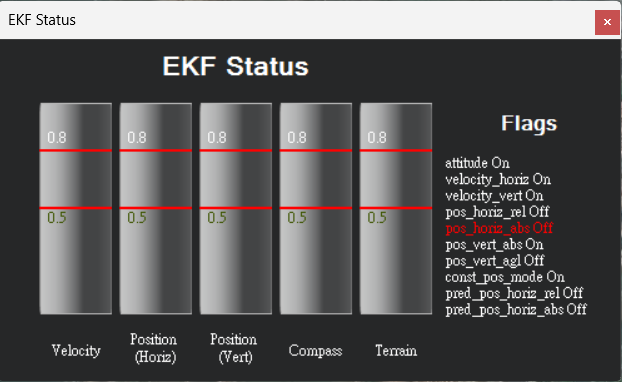
EKF status window
Vibration & Clipping
A useful VIBE reference is mostly below 30 m/s²; investigate persistent exceedance. Clip counts should not steadily increase in normal flight. Clipping means the accelerometer exceeded its range; filtering cannot recover the lost samples.
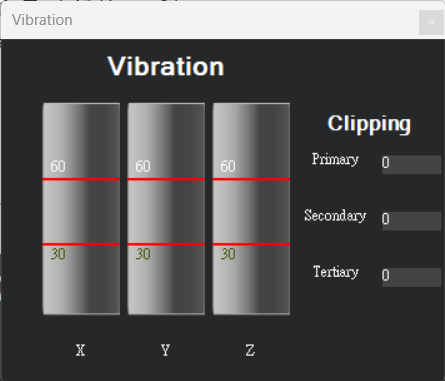
Vibration and Clip counts
Additional HUD Symbols and Source Reference Values
| Symbol | Meaning |
|---|---|
| INS Heading | Heading from the connected inertial-navigation solution. |
| rxrssi | Receiver-reported signal strength; requires receiver and controller support. |
| Central Red V | Fixed aircraft attitude reference. |
| Nav roll / Nav pitch | Green marks show navigation attitude targets. |
| Roll Arc / Pitch Ladder | Source red triangle marks roll; pitch ladder intervals are 10°. |
| GPS | No GPS → No Fix → 2D Fix → 3D Fix → 3D DGPS → RTK Float → RTK Fixed |
The PDF uses EKF 0.5/0.8 as observation points, distinguishing transient recovery from sustained increases; these values do not predict when a vehicle will lose control. Consider warnings, estimation sources, vibration and logs. The screenshot’s Bat1/Bat2 0.22 V/1.30 V are disconnected-power-module examples; disable Battery Monitor2 only when unused.
Source document:Mission Planner V2 · PDF pages 7–10