PID Structure & Filter Tuning
For SparkNavi Blue / Blue2. Screens and parameter names may vary with the ArduPilot / Mission Planner version.
Start with Mechanics & Measurements
Complete installation, sensor and ESC setup, establish a stable initial tune and review vibration logs before rate tuning. Change one related parameter group at a time and record results. The manual’s P increments, yaw values and filter frequencies are examples, not universal values for different airframes.
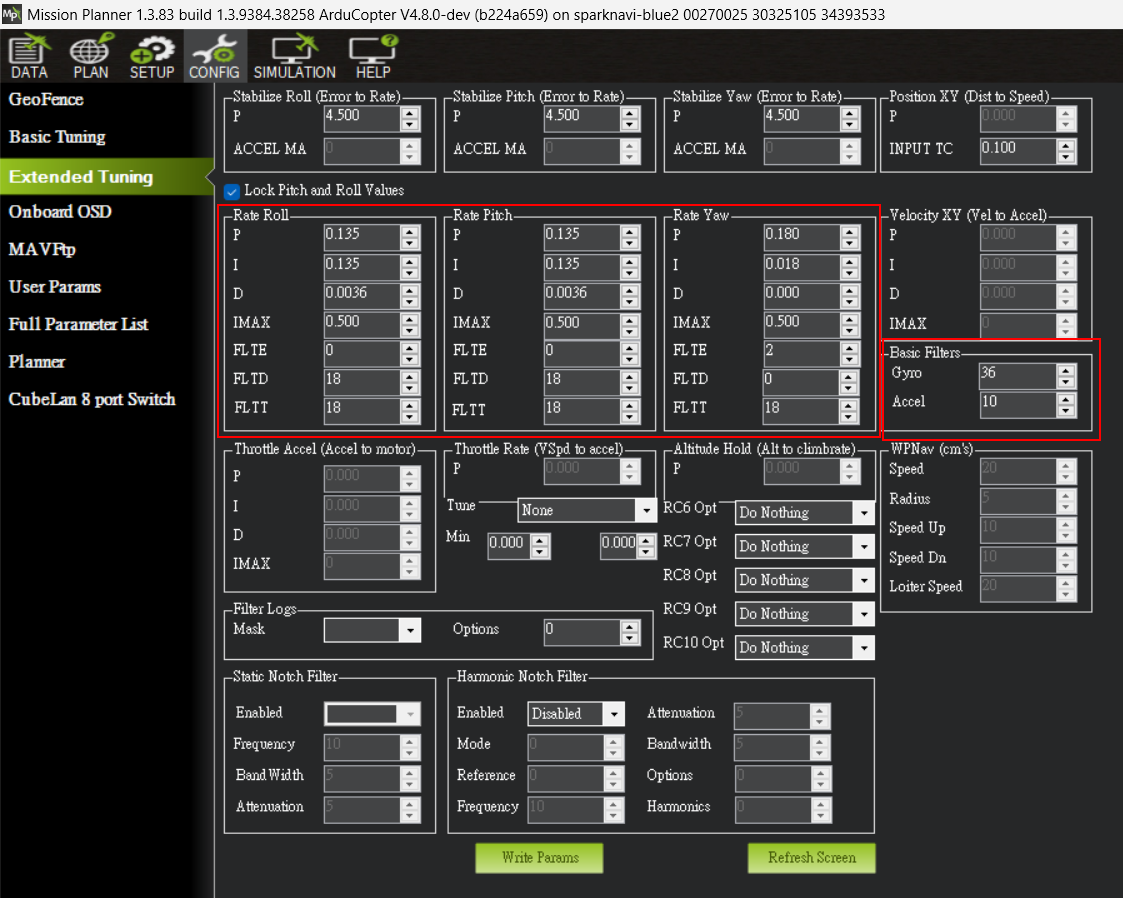
Mission Planner PID and Basic Filters example
Outer & Inner Loops
The outer loop turns angle error into a rate target. The inner loop compares target and measured rates to generate control effort. Establish stable Roll / Pitch / Yaw rate behavior before changing the outer loop and pilot response.
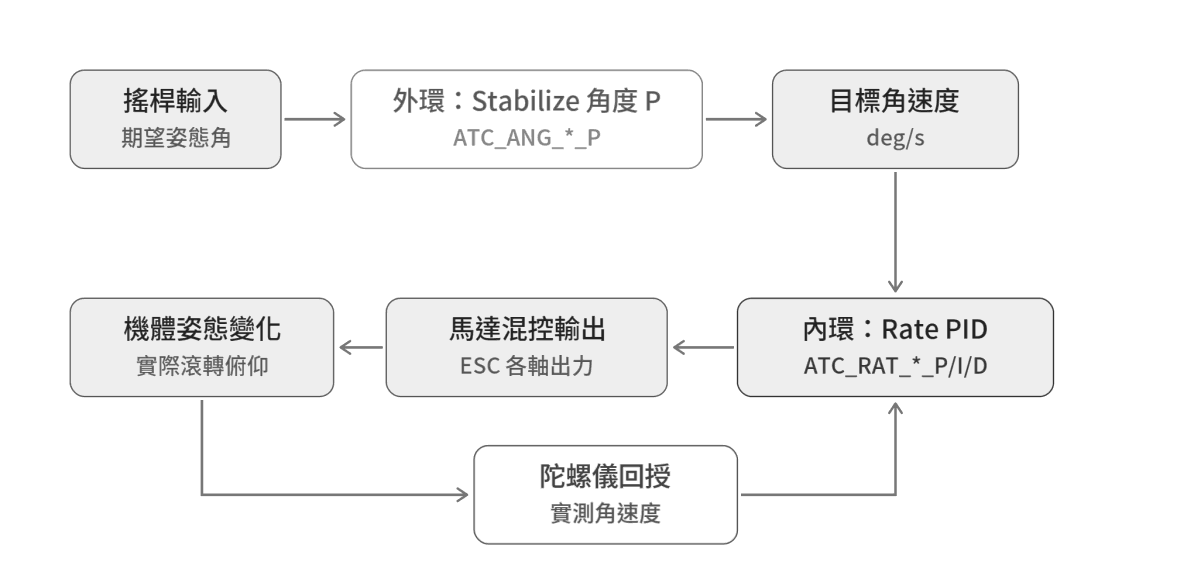
Cascaded attitude-control structure
| Term | Role | Observations |
|---|---|---|
| P | Immediate response to rate error. | Low values may feel sluggish; high values may oscillate. |
| I | Accumulates error to counter persistent bias or loading. | Too low may leave steady error; too high may cause slow oscillation. |
| D | Adds damping and opposes rapid change; noise-sensitive. | Watch overshoot, fine vibration and motor temperature. |
Roll / pitch often start with I and P of similar magnitude, but P = I is not mandatory for every axis or aircraft. Do not deliberately sustain instability to find a limit; stop an unstable tuning step.
Yaw & Stick-release Response
Yaw uses motor reaction torque and behaves differently from roll / pitch. The manual’s I ≈ P/10 and D = 0 are starting examples. If rotation continues after stick release, also inspect target rate, input shaping and acceleration limits. Excessive yaw correction can cause twitching and consume thrust margin.
Filter Locations
| Parameter | Role |
|---|---|
| INS_GYRO_FILTER | Gyro measurement low-pass cutoff. |
| INS_ACCEL_FILTER | Accelerometer low-pass cutoff. |
| ATC_RAT_*_FLTT | Target-rate filtering. |
| ATC_RAT_*_FLTE | Rate-error filtering. |
| ATC_RAT_*_FLTD | Derivative-term filtering. |
High cutoff passes more noise; low cutoff adds delay. The manual’s FLTT / FLTD = half the gyro cutoff is an initial heuristic, not a mandatory matching formula. Use firmware-specific guidance, noise spectra, notch filtering and measured response.
Source Parameter and Frame Reference Tables
The following preserves values from PDF pages 19 and 23–26 as source examples for comparison. They are not universal firmware defaults or ready-to-apply flight settings; use the workflow and flight logs.
| Item | PDF Example |
|---|---|
| Outer Attitude P | 4.5 |
| Roll/Pitch P Increment | 0.02–0.04 |
| Yaw P / Roll-Pitch P | 0.180 / 0.135 |
| Yaw I / D / FLTE | 0.018 / 0 / 2 Hz |
| INS_GYRO_FILTER | Screenshot 36 Hz; source lists default 20 Hz |
| INS_ACCEL_FILTER | Screenshot 10 Hz; source lists default 20 Hz |
| FLTE (Roll/Pitch / Yaw) | 0 / 2 Hz |
| FLTT / FLTD | Source starting reference is half the gyro cutoff |
| Source Frame Class | INS_GYRO_FILTER |
|---|---|
| 3–5 inch FPV | 40–60 Hz |
| 10–15 inch camera platform | 20–40 Hz |
| Multirotors over 20 inches | 10–20 Hz |
Low P may lag targets; high P may oscillate rapidly. Low I can leave persistent drift; high I can cause slow 1–2 s oscillation. Low D can overshoot/bounce; high D or noise may accompany high-frequency vibration and motor heating. These are diagnostic clues, not substitutes for measurement.
Source document:Mission Planner V2 · PDF pages 19–26