Mission Planner Initial Setup & Calibration
For SparkNavi Blue / Blue2. Screens and parameter names may vary with the ArduPilot / Mission Planner version.
Keep propellers off during setup. Complete calibration, motor / ESC checks and failsafe setup before the first flight. “Ready to Arm” means current pre-arm checks passed, not that the complete aircraft has been validated.
1. Frame Selection
In SETUP → Mandatory Hardware → Frame Type, choose Frame Class and the matching motor layout. A conventional X quad uses Quad + X; a Y6 selection is a different configuration.
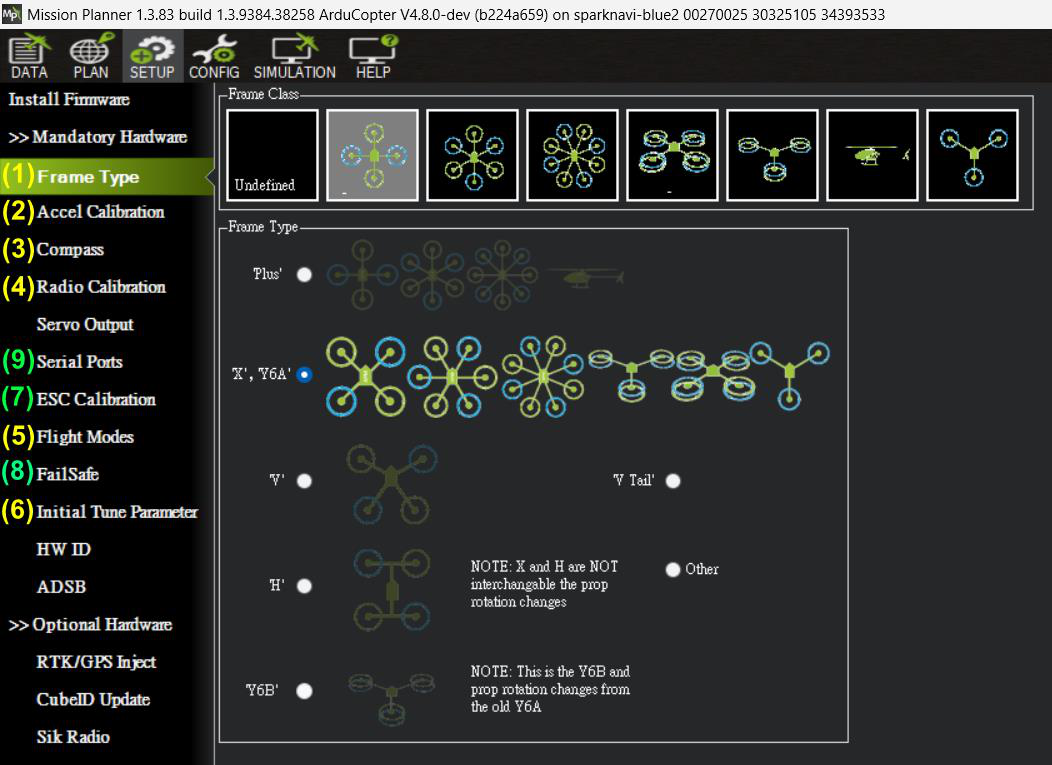
Frame and calibration settings
2. Accelerometer & Level Calibration
| Function | Purpose |
|---|---|
| Calibrate Accel | Full six-position calibration of offsets and scale factors. |
| Calibrate Level | Corrects level trim / installation tilt using AHRS_TRIM_X/Y. |
| Simple Accel Cal | Single-position simplified calibration; not equivalent to full six-position calibration. |
- Click Calibrate Accel and place the vehicle in each requested orientation. Hold it still and confirm as directed by the current interface.
- The positions include level, left side, right side, nose down, nose up and inverted. Confirm Calibration successful.
- Place the aircraft on a verified level surface, run Calibrate Level, then reboot and verify HUD orientation and level.
The calibration covers enabled IMUs. Results include INS_ACCOFFS_* / INS_ACCSCAL_* and corresponding INS_ACC2* / INS_ACC3* parameters. Recalibrate after sensor identity changes.
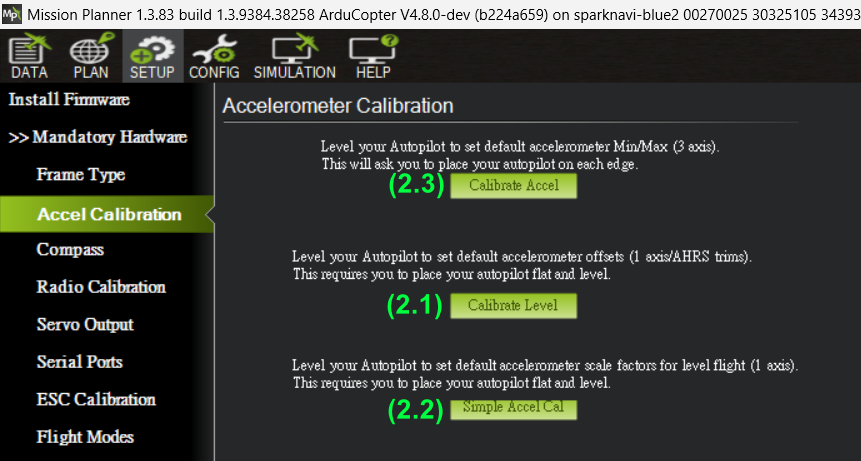
Accelerometer calibration screen
3. Compass Calibration
- Calibrate away from metal and high-current wiring, with the intended internal / external compasses selected. Blue1 uses HMC5883L; Blue2 uses IST8310.
- Start with the Default fitness threshold, click Start and slowly rotate through all orientations. Complete and reboot as prompted.
| Fitness | COMPASS_CAL_FIT |
|---|---|
| Very Strict | 4 |
| Strict | 8 |
| Default | 16 |
| Relaxed | 32 |
| Very Relaxed | 128 |
These are the UI values documented in the manual. A lower fit means a smaller fitting residual, but does not rule out in-flight magnetic interference. Improve installation before relaxing acceptance.
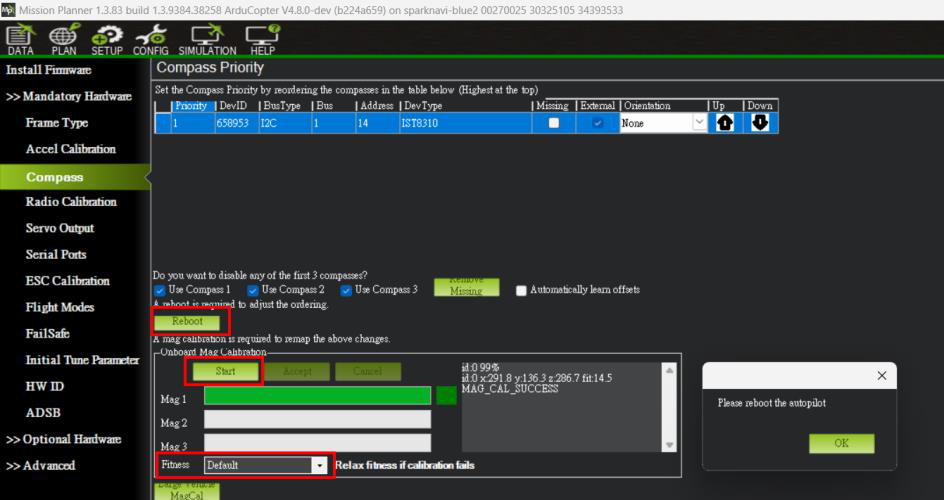
Compass calibration
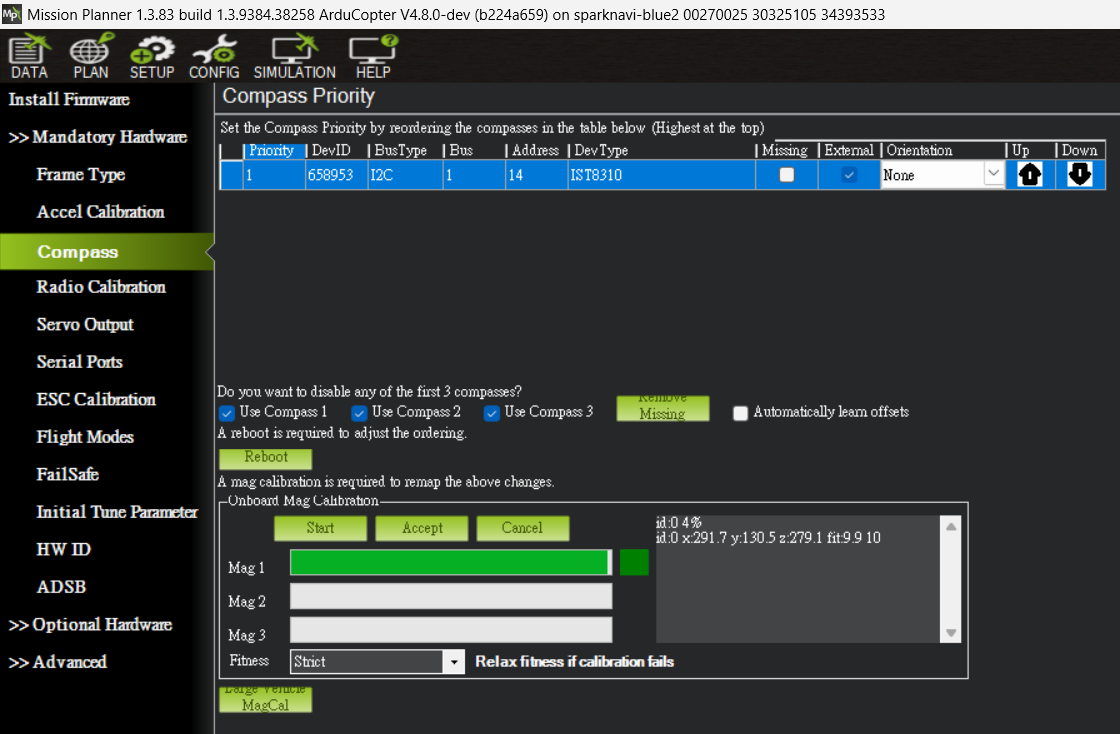
Fitness and result example
4. Radio Calibration
- Bind the receiver, verify wiring and confirm channel movement in Radio Calibration.
- Click Calibrate Radio, move sticks and used switches through their full travel, return to center and click Click when Done. Confirm saving completes.
- Verify Roll / Pitch / Throttle / Yaw mapping, direction and endpoints, plus the mode switch and receiver-loss behavior. Avoid an arm/disarm switch arrangement vulnerable to accidental operation in flight.
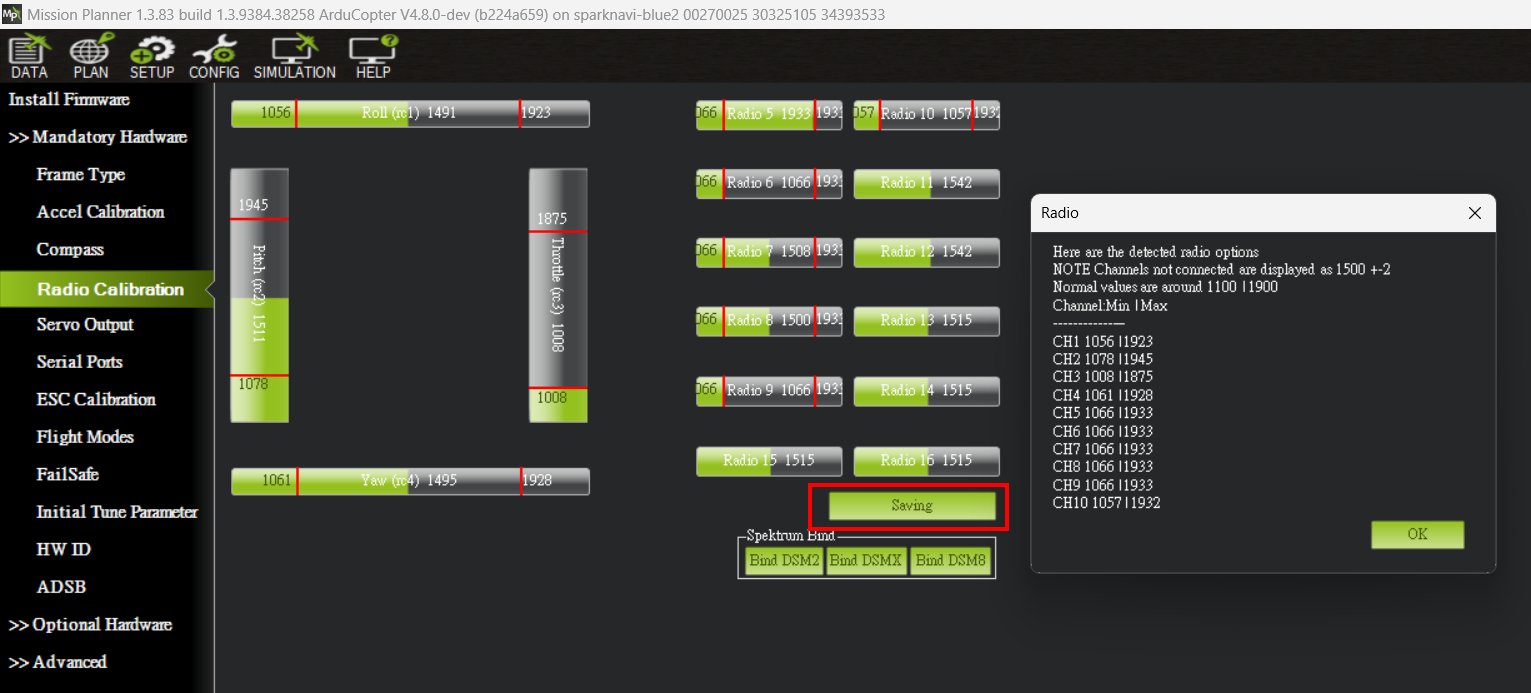
Radio Calibration
5. Flight Modes
The manual uses a CH5 three-position switch: Flight Mode 1 = Stabilize, 4 = AltHold and 6 = Loiter. Actual slots depend on receiver PWM values; check each switch position on screen.
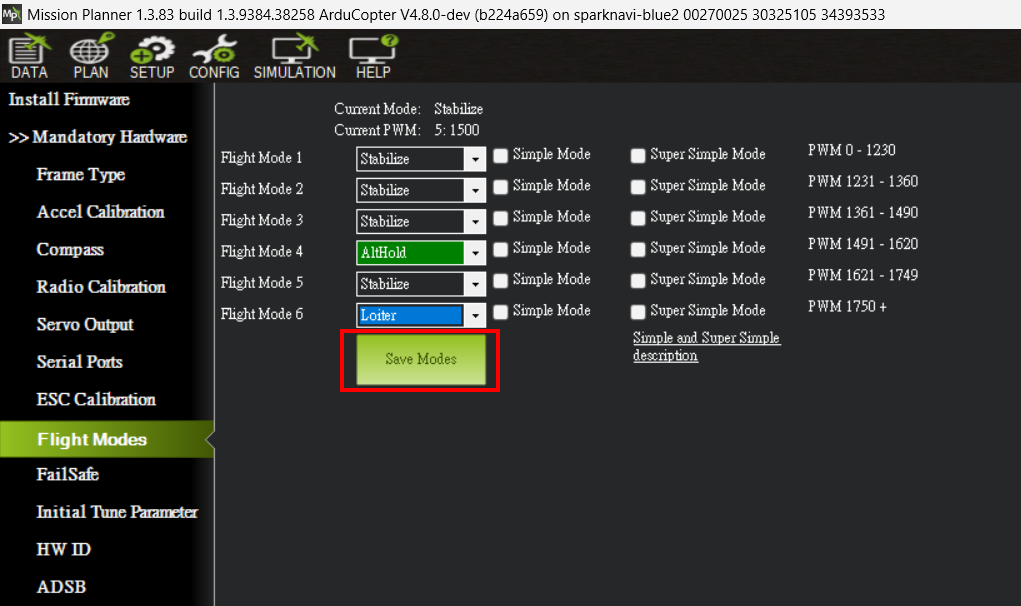
Three-position mode example
6. Initial Parameters & Battery
- Enter actual propeller size and battery cell count, calculate initial parameters, review them and select Write FC. These are starting values for tuning.
- Connect the power module and calibrate voltage / current measurement against a meter. Disable Battery Monitor2 only when it is unused; retain and calibrate both monitors for dual supplies.
- Complete ESC protocol setup and any required calibration, then verify RC-loss, battery and RTL / landing failsafe configuration before flight.
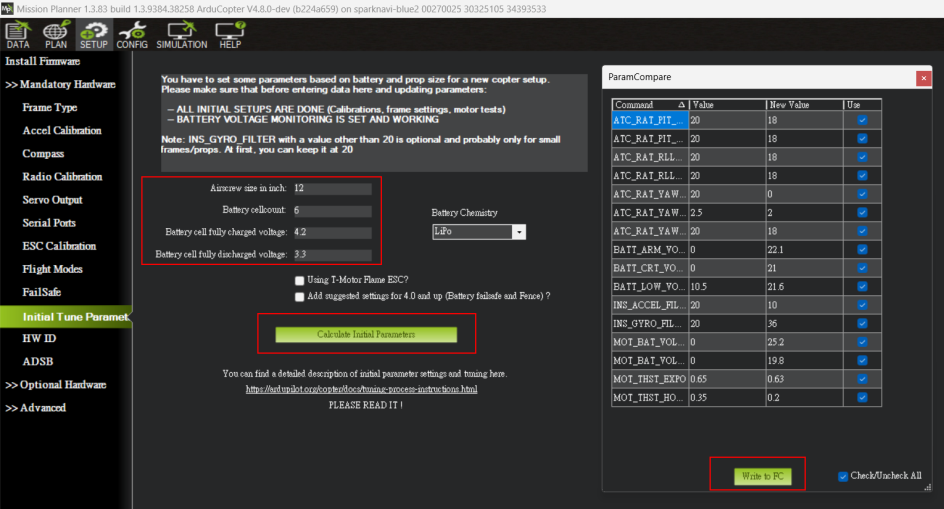
Initial-parameter calculation
7. Final Checks
Reboot after writing parameters, reconnect and check current Messages, HUD and PreArm checks. Save a parameter backup and resolve warnings before arming. Actions → Arm/Disarm and transmitter arming can both start motors; keep propellers off for bench tests.
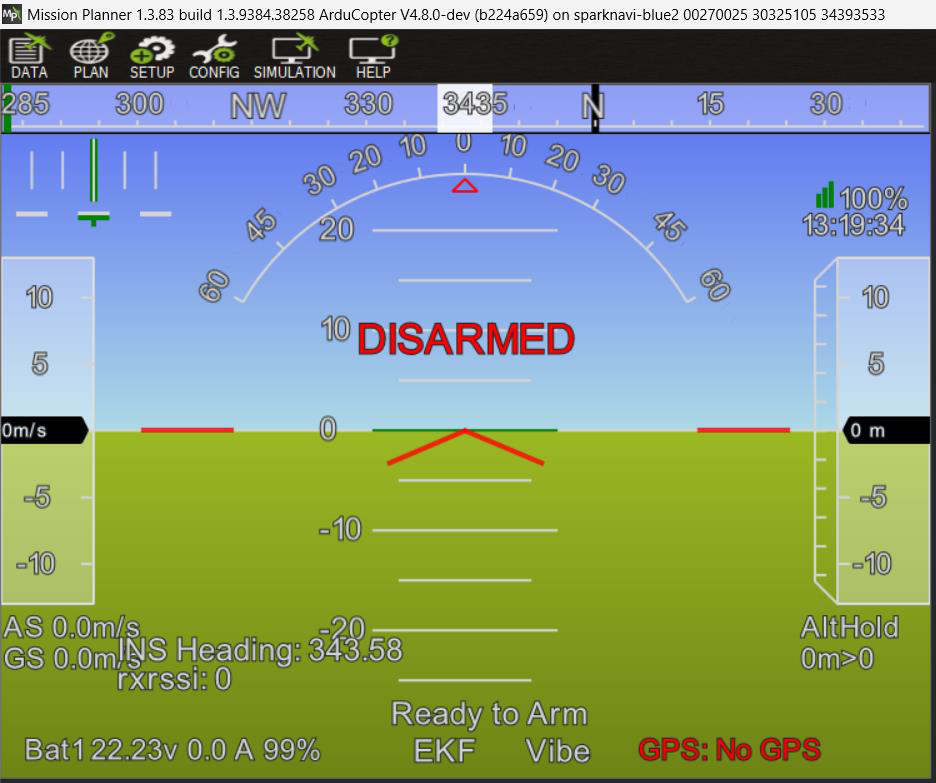
Ready to Arm example
ArduPilot accelerometer-calibration guide
Calibration Controls and Parameters
The source uses Ctrl+F → reboot pixhawk to restart. Calibrate Accel positions are LEVEL, LEFT, RIGHT, NOSE DOWN, NOSE UP and BACK. Hold still and confirm as prompted; the source UI uses any keyboard key. Allow enough cable length for rotation without straining connectors.
INS_ACCOFFS_X / INS_ACCOFFS_Y / INS_ACCOFFS_Z
INS_ACCSCAL_X / INS_ACCSCAL_Y / INS_ACCSCAL_Z
INS_ACC2OFFS_* / INS_ACC2SCAL_*
INS_ACC3OFFS_* / INS_ACC3SCAL_*
INS_ACC_ID / INS_ACC2_ID
AHRS_TRIM_X / AHRS_TRIM_Y
Full six-position calibration estimates axis offsets and scales; a single Simple Accel Cal pose cannot solve all axis scales. Sensor IDs associate calibration with hardware, so recalibrate after replacement. Radio sequence: Calibrate Radio → Click when Done → Saving → Completed; unresponsive channels also warrant checking binding, power and protocol.
Source document:Mission Planner V2 · PDF pages 11–18